DevEngi @DevEngi
psh Toledo, OH Joined June 2018-
Tweets19
-
Followers13
-
Following3
-
Likes3
#100DaysOfCode #100DaysOfSwift #Swift Day 17: Worked on displaying a detailed view with a custom animated segue. Mentally demanding day at work = fried brain when trying to code. Time to meditate and escape the brain sprint for the day.
#100DaysOfCode #100DaysOfSwift #Swift Day 16: animating the cell for a long press was fun! usingSpringWithDamping and initialSpringVelocity can add such a cool feel
#100DaysOfCode #100DaysOfSwift #Swift Day 15: Added drop shadow and corner radius to the cells. It's amazing how much these simple changes can improve the feel of an app.
#100DaysOfCode #100DaysOfSwift Day 13 & 14: so.much.learning. Creating a UICollectionView with custom cells and utilizing xib files is great stuff! Looking forward to advancing this one!
#100DaysOfCode #100DaysOfSwift Day 12: Started a new project to mimic the App Store feed with a UICollectionView. I love the feel of the new App Store so I am really looking forward to advancing on this one!
Some people learn better by reading first and then coding. Others learn better by coding and then reading more details after. Try to figure out which works better for you, it will make life easier. #100DaysOfCode #programming #javascript #webdevelopment #csharp #java #code
#100DaysOfCode #100DaysOfSwift Day 11: NavigationController added and made some changes to the Navigation Bar in my Tabata Timer. Continued with reviewing iOS dev resources to sharpen my understanding of some programming fundamentals and best practices.
#100DaysOfCode #100DaysOfSwift Day 10: installed the SwiftySound cocoapod for use in my Tabata Timer. Added a nice subtle beep at the end of each round. Looking into saving a user's settings like volume and a workout template. Small, consistent steps
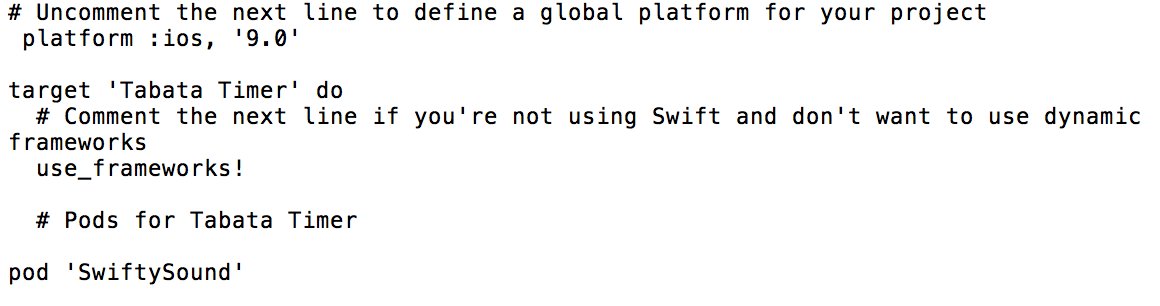
#100DaysOfCode #100DaysOfSwift Day 9: removed start/pause button and replaced with UITapGestureRecognizer. Also spent time refreshing myself on autolayout, saving user settings, and adding some sound.

#100DaysOfCode #100DaysOfSwift Day 8: Tabata Timer is coming along nicely! Next will be a navigation bar and changing the buttons to just simple "tap anywhere" for start and pause. Note: Timer temporarily sped up for video's sake
#100DaysOfCode #100DaysOfSwift Day 6-7: Who knew getting data formatted how you want it could be such a pain? Dealing with optionals and different types kept things interesting these last two days. Still nailing down function then I'll be tackling the UI and UX!
#100DaysOfCode #100DaysOfSwift Day 5: focused on segues and adding an additional ViewController to my Tabata Timer. Also went back and reviewed some of the videos from @yu_angela's Udemy course that I completed earlier this year. Forgot how much I missed it!


The joke about how naming is one of the hardest problems in programming makes it seem superficial. IMO it's hard because it's the problem of figuring out how to articulate an abstraction, which is one of the most important parts of design.
@lfosgett @_100DaysOfCode I utilize my lunch time while my brain is still sharp. Find a coffee shop that’s close and throw some headphones in. Music helps so much with finding and staying in a zone. I find that coding after work is tough bc I’m mentally exhausted - meditation can bring some revival tho
#100DaysOfCode #100DaysOfSwift Day 4: multiple UIPickerViews in one view with different data sets, working with the tag property, and studying up on performing segues and moving data between views
#100DaysOfCode #100DaysOfSwift Day 3: working with UIPickerViews and data source and delegate methods. Goal is to build a functional Tabata timer with user input and segues.

#100DaysOfCode #100DaysOfSwift Day 2 Fundamentals: Adding a button programmatically, multiple gestures on one button, & recognizing long gestures
#100DaysOfCode #100DaysOfSwift Day 1 Fundamentals: Linking IBOutlets, creating functions, varying RGB values. Inspired by @samvlu medium.com/@samvlu/100-da…
So it begins - Day 1 of #100DaysOfCode #100DaysOfSwift with a focus on iOS front end dev. Here to document my personal development. Goal: transition from electrical engineer to full time iOS app dev in 2019

Luis Espinosa @LuisEsp17702474
1K Followers 3K Following Lic.En Finanzas Contador Público Egresado de: UASD. Diplomado en Marketing Político y Político.
billnee @billnee
25 Followers 145 Following

Front End Chile @FrontEndChile
405 Followers 2K Following @FrontEndChile, es una comunidad dedicada a compartir, enseñar y aprender sobre el desarrollo web.

Saad Mahbub @saadweb_dev
328 Followers 2K Following Top rated WordPress expert and Full-stack developer. Love building businesses or to be a part of it!
Chris Patterson📱�... @chrispatterson
869 Followers 1K Following Sr. Software Engineer, iOS — https://t.co/ilaeXXPTjE (Opinions are mine alone.)


Emilio P @iPortoG
523 Followers 5K Following Industrial Engineer, MBA, YCombinator SUS Grad 2018, Self-taught iOS Engineer #Swift. Full-stack Dev in process, in pursuit of my dream!!!. ❤️ my Perú & Tennis
Adrian Carolli @icookandcode
5K Followers 6K Following Building React Native Apps, Investor, and Tech Evangelist 🥑 | Ex @penta_medical YC S18 | React.js | Remote at @g2i_co 💻 🇨🇦 | OSS ❤
Ryan_wilson @ryan_wilson_97
1 Followers 2K Following

Laura Shin @laurashin
291K Followers 6K Following Crypto journalist 🎧 Host @unchained_pod 📚 Author, The Cryptopians 💌 Sign up https://t.co/gf90Q5GrXy Ads [email protected]

You might like